Day73

Your whole day, on one screen.

Tasks · Habits · Calendar · Journal · Notes · Health · Focus · Vault

Day73 replaces the stack of apps most people juggle with one fast, quiet workspace for computer and phone. It shows what matters now and here — by time of day and by place — and gives everything you finish a score, so one day can be weighed against the next.

No sign-up for the demo Computer & phone 20 tools, one login
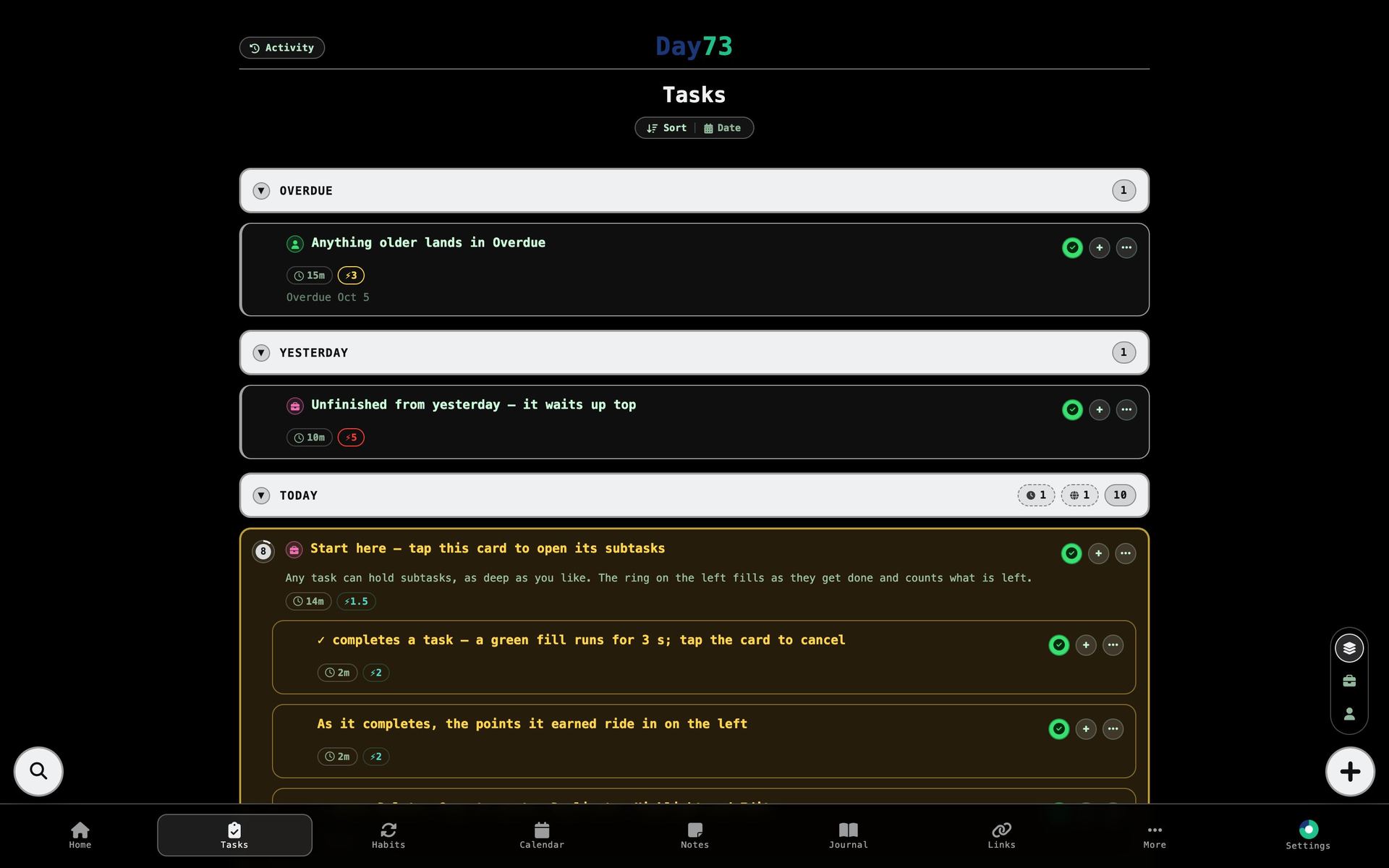
day73.com — Tasks
Day73 Tasks on a computer: Overdue, Yesterday and Today groups, with the highlighted Start here card open onto its subtasks
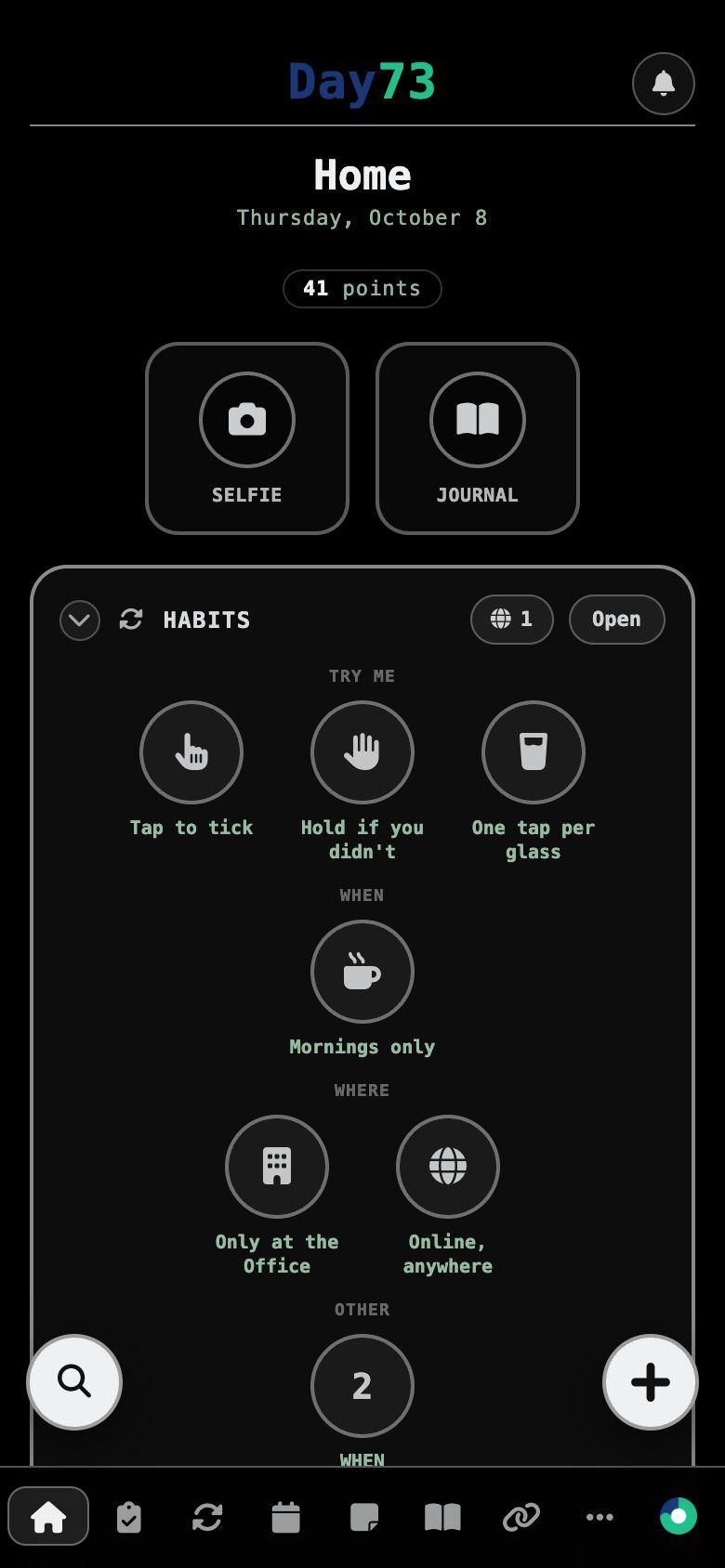
Day73 Home on a phone: today's points, Selfie and Journal tiles, and habits grouped into circles
▼Try it here1

Every action gives you three seconds to change your mind.

Complete, delete or archive anything in Day73 and a fill sweeps across the card. Tap it again and nothing happened. Let it run and the work is saved — and the points it earned ride in on the left and land on Home’s total.

These two cards work like the real ones. Tap ✓, then tap the card to cancel — or don’t.

Today · 31 points
2 22
Finish the quarterly report
1h⚡4 Work
★ 9
Call the bank before 5
15m⚡3 Personal★ Highlighted


▼A look inside12

The real app, on a computer and a phone.

Screenshots from the demo account — the same one you can open yourself. In it, every task, habit and note is named for the feature it shows you.

day73.com — Home
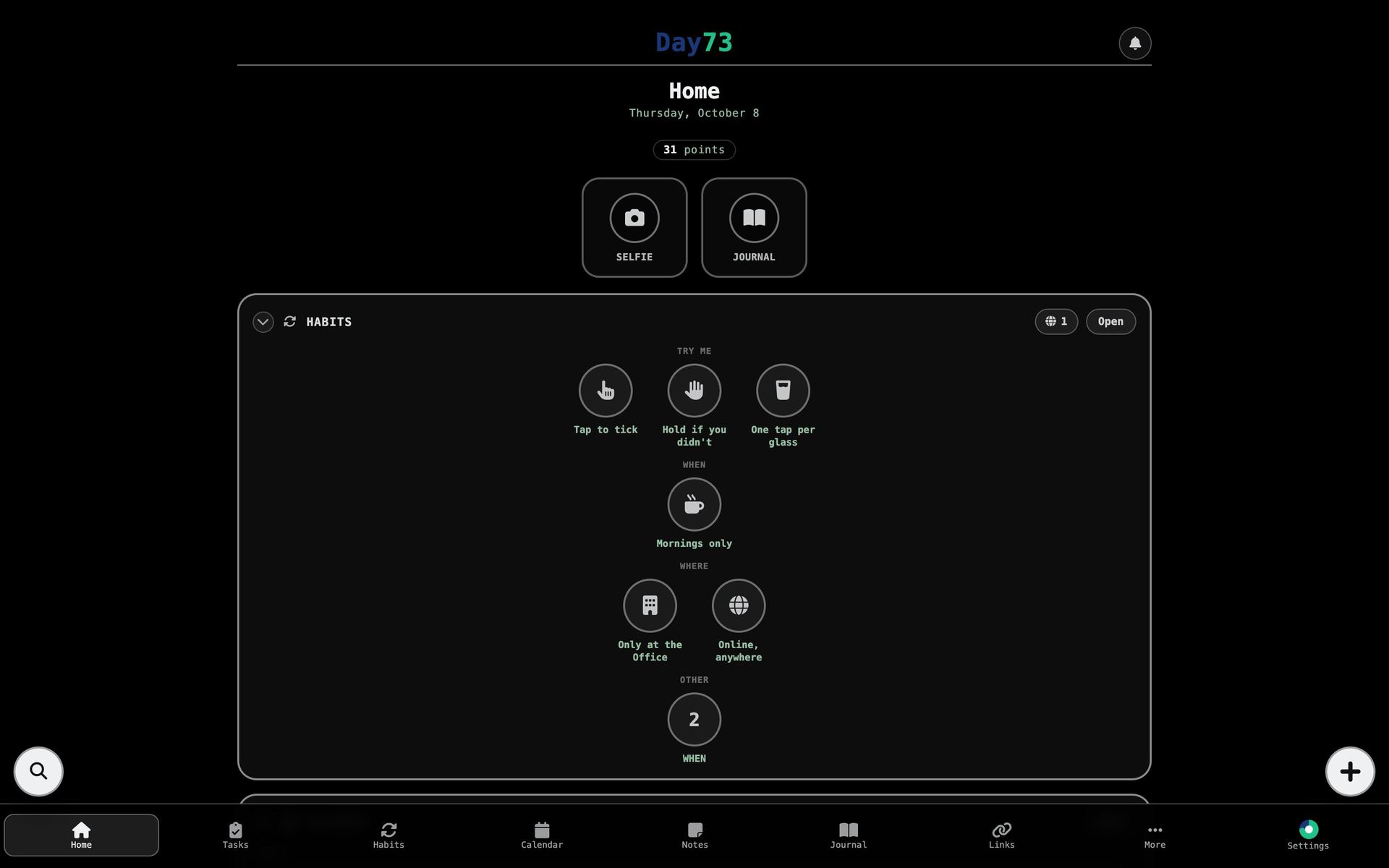
Day73 Home on a computer
Day73 Home on a phone

Home. Today on one screen: points so far, the day’s selfie and journal, the habits whose time has come, the next three days of calendar and today’s tasks. Which sections show, and in what order, is set per device.

▼The details8

A list of everything is a list of nothing.

Day73 keeps each thing out of the way until it’s due, where it’s due — and makes the everyday actions fast enough to disappear.

By time of day

Give a task or habit a morning, evening or custom window and it turns up when that comes round. A habit then stays three hours past its window, marked overdue, before it steps aside.

By place

Tie things to the office, the gym or home — on chosen weekdays if you like — and they show only when you’re there. Pills on each group count what’s waiting elsewhere, later, or online; one tap shows them.

Points that mean the same thing next month

Each finished task is scored 1–99 once, by the AI you connect, against a fixed scale and a handful of your own past scores, so a 40 stays a 40. No AI? A formula from duration and urgency stands in. Set any score by hand and it’s never touched again.

Built for thumbs and keyboards

On a phone: swipe a task right to complete it, left for its actions, all the way left for a subtask, hold to select several. On a computer the same tray slides open from the ✓ … + buttons, and ← → switch Work and Personal.

Type a whole plan at once

Press Tab in the task window to write an outline — one task per line, indent for subtasks, extras after a “ / ”. Copy any task back out as the same text and it round-trips intact.

Plan the offsite / 3 Book the venue / 30min / 4 Send invites / Office / morning Draft the agenda / 45min / share by Friday

See what a good day goes with

Stats sets your points against last night’s sleep, a workout, your readiness score and your habits — with a trend line, by hour, by weekday — all drawn as plain SVG, no chart library.

A journal you’ll actually keep

Thirty seconds, starting at your first word and saving itself at zero. Each Saturday and each month, a short reflection is written back to you — and any entry can be kept out of it.

Focus that holds the line

A browser extension sorts the sites you visit into your own categories and holds each to a daily allowance or schedule. Tightening a rule is instant; loosening one waits a couple of hours, so the impulse passes first.

Done Gone or missed Highlighted Everything else
▼Modules20

Everything a day runs on, built in.

Each module stands on its own and shares the same interface. Pick which ones sit on Home and in the tab bar, in your order, per device — the rest wait under More.

Plan
HomeYour day on one screen
TasksNested, timed, place-aware
CalendarViews, feeds, share links
GoalsDue dates and reminders
ListsNested, dated, linked
Track
HabitsStreaks, parts, schedules
StatsPoints, sleep, patterns
HealthFitbit and Pixel Watch
SelfiesOne a day, as a time-lapse
Journal30 seconds, then reflections
Keep
NotesRich text and attachments
PasswordsEncrypted, PIN-locked
SketchA notebook that syncs
ShareA 24-hour device clipboard
ActivityDone, archived, restorable
Focus
AssistantPlain English, real actions
FocusA browser extension that holds the line
PomodoroFocus and break cycles
SearchEverything, in one box
LinksYour own sites in the tab bar
▼How it’s built9

Designed and engineered end to end — no framework, no template.

Every screen, interaction and integration in Day73 is custom: server-rendered PHP and MySQL, plain JavaScript and CSS, and a deliberately small set of dependencies.

Screens25+one codebase, computer and phone
AI providers5Gemini, Claude, OpenAI, Grok, OpenRouter
Frameworks0plain PHP and vanilla JS
Chart libraries0charts are custom SVG

AI that can’t go off the rails

The assistant turns plain English into real actions — add a task, tick a habit, find a free afternoon. Every item it names is checked against the user’s own data before anything is touched, each change is read back with a three-second confirm, and “Wrong?” undoes it.

Provider-agnosticFallback chainSpeech in & out

An encrypted vault

Each password is encrypted on its own with AES-256 and decrypted only when asked for. The vault has its own 6-digit PIN, slows down after wrong guesses, and locks again after five minutes.

AES-256-CBCPer-entry IVRate-limited PIN

Calendars that speak the standard

Subscribe to any ICS or webcal feed, with time zones and repeating events expanded; share any calendar back out as a private, revocable link that Apple Calendar, Google Calendar and other calendar apps can follow.

RFC 5545RecurrenceToken feeds

Health from the watch

Sleep, heart and activity come from the Google Health API over read-only OAuth, tokens kept server-side. Each metric is compared with the user’s own usual, and a Sleep and Readiness score is written once each morning.

OAuth 2.0Fitbit · Pixel WatchBaselines

A browser extension

A Manifest V3 extension enforces Focus rules before a page loads, counts only foreground, non-idle time, closes tabs a new schedule covers, and ships with a self-updating installer.

Chrome MV3Live sweepsAuto-update

Notifications everywhere

Reminders for tasks, habits, goals and events go out through Web Push and Firebase Cloud Messaging, with quiet hours, per-category switches and never the same alert twice in a day.

Web Push · VAPIDFCM v1Quiet hours

Two-way task sync

Freedcamp tasks sync both ways: changes push out immediately, failures queue and retry, and content fingerprints stop edits echoing back and forth.

Signed APIOutbox retriesConflict rules

A sandbox for every visitor

The live demo creates a private account per visitor, fills it with guided sample data, turns every outside connection off, and deletes it all when they leave.

Isolated accountsSchema-aware seedingAuto clean-up

Small things, done properly

Actions started just before you navigate away still finish. Layouts are remembered per device. Deleted things wait 30 days in Activity. Selfie time-lapses record straight to video in the browser.

Beacon commitsPer-device layoutCanvas → MP4
▼Live demo3

Don’t take our word for it — click everything.

The demo is the real app with a private account of your own, already filled with a month of history. Every sample task, habit, note and event is named for what it shows you, so the app explains itself as you go.

Nothing to sign up for

Open it and you’re in. No email, no password, no card.

Computer or phone

A switch at the top flips between the desktop layout and the phone one — swipe gestures included — in the same session.

Yours, then gone

Change anything; nobody else sees your copy, and it’s deleted when you leave. Outside connections and AI stay off, and the vault (PIN 000000) never keeps what you type.

▼Work together1

Let’s build something together.

Whether you’d like to partner on Day73, bring it to your team or customers, or talk about building something just as considered for your own product — we’d love to hear from you.

admin@day73.com